
myQQ – Quick Quack
Quick Quack Car Wash, LLCAuto & Vehicles
4.5405.00 Reviews
- Version
- 4.32.0
- Installs
- 100.00K
- Age Rating
- Everyone
Screenshots

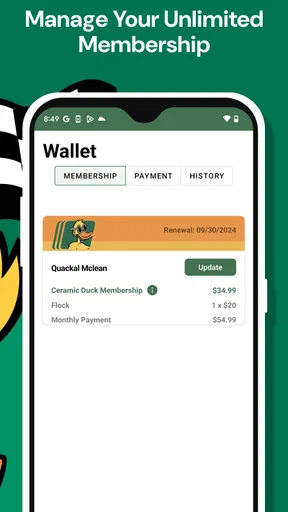
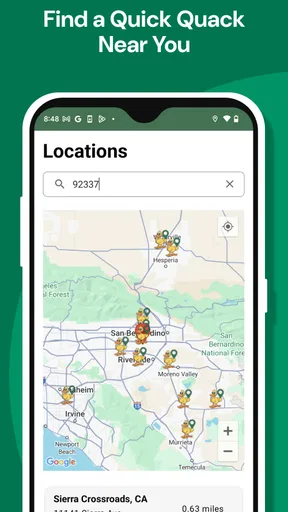
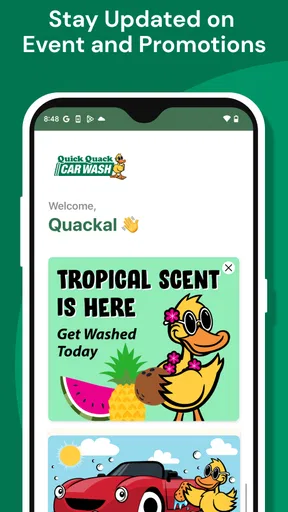
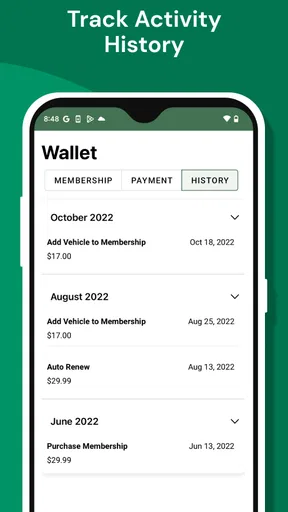
Our Review of myQQ – Quick Quack
 Analysis by Appyee
Managing a car-wash membership sounds simple until you need to check whether it is active, understand what you are paying for, or make a quick decision before driving through a wash. That is the narrow problem myQQ – Quick Quack is built around. I reviewed it as a companion for Quick Quack Car Wash members, not as a general car-care tool, and that distinction matters from the first tap.
The app comes from Quick Quack Car Wash, LLC and is free to install. Its purpose is to manage a Quick Quack unlimited membership from a phone, so its usefulness depends heavily on whether you already use that particular car-wash service. If you do, it can put membership-related tasks in one place instead of making you rely on memory, paper details, or a separate browser visit. If you do not, there is very little reason to keep it installed.
What I liked most is that the app has a clear job. It is not trying to become a navigation app, a vehicle-maintenance tracker, or a marketplace for unrelated products. That focus makes the experience easier to understand, while also making its limitations obvious. This is a practical account companion rather than an app I would open for entertainment or everyday driving.
What myQQ is really useful for
In the Auto & Vehicles category, many apps try to cover too much: fuel prices, parking, roadside assistance, service reminders, maps, or insurance documents. myQQ takes a much smaller route. It centers on the relationship between the customer and Quick Quack Car Wash, especially the unlimited membership that the app is designed to manage.
That focus is valuable when a membership is part of your normal routine. For example, imagine leaving work after a dusty commute and noticing that rain is expected later. You are already near a Quick Quack location and want to make sure your membership is still in order before stopping. A dedicated membership app is more convenient than searching old messages or trying to remember which account details you used. The benefit is not dramatic, but it is exactly the kind of small convenience that makes a recurring service easier to live with.
I also found the narrow scope helpful when thinking about expectations. This is not a replacement for the car wash itself, and it does not turn an unlimited plan into a universal pass for other wash brands. The app is best understood as a digital control point for an existing Quick Quack relationship. That makes it a sensible download for current members, but a poor choice for someone comparing independent car washes or looking for broad vehicle utilities.
The store listing presents it as a free app for everyone, and its current version is 4.25.1. It supports Android 7.0 and later, which gives it a wide compatibility range for people who keep an older phone. The service has also attracted a substantial Android audience, with over 100 thousand installs and a 4.7 average from around 3.2 thousand ratings. Those figures suggest that the app is established enough to be familiar to many members, although popularity alone should not replace checking whether its controls suit your own needs.
A membership tool rather than a full car-care assistant
The most important trade-off is specialization. If your main goal is to manage a Quick Quack unlimited membership, the limited scope is a strength because the app does not bury the central task beneath unrelated dashboards. If you want fuel tracking, maintenance reminders, parking payments, or a record of your vehicle expenses, you will need another tool.
This is also where the usual alternatives become relevant. A mobile browser can sometimes handle account access, but a dedicated app is easier to return to when the same membership task comes up repeatedly. On the other hand, a browser remains the better option for someone who rarely visits Quick Quack or does not want another app connected with a service account. The choice is less about which approach is universally superior and more about how often you use the membership.
I would also separate myQQ from a general loyalty app. A loyalty app may focus on points, coupons, or offers across several businesses. This one is tied to Quick Quack membership management. That narrower connection can reduce confusion, but it also means there is no reason to expect the broader rewards or comparison features found elsewhere.
Trust starts with a clear purpose
For me, trust in a service app begins with whether I can understand why it exists and what I am being asked to do. myQQ has a straightforward explanation: it is for managing a Quick Quack Car Wash unlimited membership. That clarity is reassuring because the app’s role is not hidden behind a vague promise about improving every part of car ownership.
The developer is identified as Quick Quack Car Wash, LLC, which makes the connection between the app and the service it represents easy to recognize. I prefer that kind of direct relationship in an account-management app. It gives me a clear starting point when deciding whether the application belongs to the company I already deal with, rather than to an unrelated third party using a similar name.
At the same time, I would not treat a recognizable developer as a complete privacy guarantee. A membership app may still involve account information and other choices that deserve attention. My approach is to read each permission request and account screen rather than approving everything automatically. The app’s focused purpose makes that review easier because I can ask a simple question: does this request make sense for managing my Quick Quack membership?
Permissions and data-sensitive moments
One of the most useful habits with any account app is to pause at moments involving sign-in, saved details, notifications, or device access. I would do that here as well. A car-wash membership may feel low-risk compared with banking, but it is still connected to a real service relationship. I would check that I am using the official developer identity, review what the app asks to access, and avoid entering information on a screen that does not look consistent with the Quick Quack service.
I also recommend paying attention to notification choices. A membership app can be convenient when it gives timely account information, but unnecessary alerts quickly turn a useful tool into background noise. If notification controls are offered, I would keep only the messages that help me manage the membership and disable anything I do not want. That is a small example of user agency: the phone should support the service without constantly interrupting the rest of the day.
Another data-sensitive moment is using the app on a shared or borrowed phone. I would sign out when appropriate and avoid leaving an account open on a device that other people can access. This is not a criticism unique to myQQ; it is simply sensible behavior whenever an app is tied to a paid or recurring service. The important point is that convenience should not remove basic control over who can view or change account information.
Before installing, I would also inspect the app’s permission and privacy information in the store and during setup. Those screens are the right place to make a decision about data practices because they can change with updates. I would not assume that a car-wash app has no meaningful data considerations just because the service itself is ordinary. A cautious review of visible choices is more useful than making broad claims about information the app may or may not handle.
Where the app gives the member control
The strongest user-control question is whether the app helps me see and manage my membership without forcing me to depend on customer support for every ordinary task. That is the promise of a dedicated membership companion, and it is the standard I would use when evaluating myQQ. The app should make routine account decisions understandable, especially when I am checking the status of a recurring service.
I would approach any change carefully, particularly if it affects billing, renewal, vehicle details, or the ability to use the wash. Before confirming an action, I would look for a clear summary of what is changing and keep a record of important account information. If a screen feels ambiguous, I would stop rather than tap through quickly in a parking lot. A good account workflow should support deliberate choices, but the user still needs to read the final confirmation.
That is one reason I would not install the app immediately before an urgent wash and expect to learn everything in the queue. A better workflow is to set it up at home, sign in with time to spare, and review the available account controls while the situation is calm. This also gives me a chance to decide whether notifications are useful and whether the account displays the membership information I actually need.
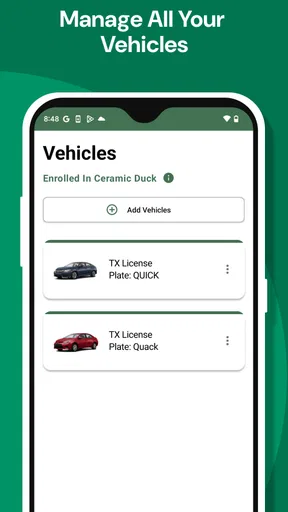
For families or people who share vehicles, the practical question is who should control the account. I would avoid casually sharing login details and would instead use the account’s visible management options or contact the service if a membership needs to be handled by another person. The app may be convenient for the primary member, but convenience does not automatically solve questions about authorized users, multiple vehicles, or changes to the account.
Everyday strengths and real friction
The everyday strength is reduced friction for repeat customers. When I use the same service regularly, a focused app can save the mental effort of remembering where membership information lives. It can also make the service feel more manageable because I have a dedicated place to return to instead of treating every account question as a separate customer-support problem.
The main weakness is equally clear: the app has little value outside the Quick Quack ecosystem. Someone who washes a car only occasionally, alternates between several brands, or prefers to keep all service accounts in a browser may find the extra installation unnecessary. In that situation, the app’s specialization becomes overhead rather than convenience.
There is also a practical dependency on account access and the phone itself. If the device is offline, damaged, shared, or unavailable, an app-based workflow may be less comfortable than having another way to verify membership details. I would not rely on any single mobile app as my only memory of a recurring service. Keeping basic account and support information accessible through the normal channels is a sensible backup.
Another trade-off is that a high rating does not tell me whether every workflow will feel equally smooth on every phone. The app is well regarded overall, with 366 written reviews alongside its broader rating count, but individual experiences can still differ according to device age, account history, and what the member needs to change. I would see the rating as encouraging rather than as a promise that every edge case is effortless.
Who should install it and who should skip it
I would recommend myQQ to an active Quick Quack unlimited member who wants a convenient way to manage that membership from Android. It is especially suitable for someone who visits often, prefers a dedicated account experience, and is comfortable reviewing account choices on a phone. The free price removes one barrier to trying it, although the value comes from the membership relationship rather than from the download itself.
I would be more cautious about recommending it to someone who is only researching car washes. Installing it before deciding whether Quick Quack is the right service adds little. A person who already has too many service apps may also prefer a browser-based approach unless the app saves enough time to justify another account on the phone.
It is not the right tool for a driver seeking a complete vehicle-management system. If your priorities are maintenance schedules, fuel costs, parking, roadside help, or comparisons between wash providers, myQQ will not replace those specialized options. Its value is strongest when the question is specifically, “How do I manage my Quick Quack membership?”
My cautious verdict after using it
I see myQQ as a sensible, focused companion for the people it is actually made for. It does not need a long feature list to be useful; it needs to make membership management clear, predictable, and respectful of the user’s choices. The connection to Quick Quack Car Wash, LLC is easy to understand, the app is free, and its broad Android compatibility makes it accessible to many current members.
My recommendation comes with a boundary: install it because you use Quick Quack, not because you expect a general car-care app. Set it up before you need it, review permissions and visible privacy choices, keep notifications under control, and slow down before confirming account changes. Those habits matter more than simply seeing a strong rating in the store.
In the end, I would keep it on my phone if I had an active Quick Quack unlimited membership and used the service regularly. I would skip it if I visited rarely, preferred a browser, or wanted broader vehicle tools. The best reason to choose myQQ is focused control over a Quick Quack membership, not a promise of features beyond that job.
Privacy and Permissions
See what permissions an app requests and how it handles your data.
- Location
- approximate location (network-based), precise location (GPS and network-based)
- Photos/Media/Files
- read the contents of your USB storage, modify or delete the contents of your USB storage
- Storage
- read the contents of your USB storage, modify or delete the contents of your USB storage
- Camera
- take pictures and videos
- Other
- view network connections, full network access, reorder running apps, prevent device from sleeping
Verdict
Strengths of myQQ – Quick Quack
- Fast access to nearby car washes and service details.
- Convenient booking options help reduce waiting time.
- Useful location features make finding participating sites simple.
- Clean, straightforward interface is easy for first-time users.
- May provide member benefits, offers, or loyalty rewards.
Limitations of myQQ – Quick Quack
- Availability depends on participating Quick Quack locations.
- Some features may require an account or personal information.
- Prices and services can vary between different wash sites.
- Booking times may be limited during busy periods.
- The app is less useful in areas without nearby locations.
Similar Picks in This Category
View All
Android Auto
Google LLC4.1

maxim — order a taxi & food
PT. SITO4.7

Штрафы ГИБДД: проверка с фото
Pays LLC – Штрафы ГИБДД4.7

Номерограм – проверка авто
Авто Ассист4.8

Дром Авто
Дром4.9

Frequently Asked Questions
What is myQQ – Quick Quack, and what can I do with it?
myQQ – Quick Quack is a mobile application designed to give users access to Quick Quack Car Wash services from their smartphone. After installing it, you can typically explore available wash options, review membership or subscription choices, locate participating car wash sites, and manage account-related details. The app is most useful for customers who regularly use Quick Quack and want a faster way to handle services without visiting a counter first.
Can I purchase or manage a Quick Quack membership through the app?
The app is intended to make Quick Quack membership management more convenient. Depending on your location and the current services supported, you may be able to review available plans, start a membership, update payment information, or check account details. Before subscribing, carefully read the plan description, billing frequency, cancellation conditions, and location coverage, since membership availability and terms can vary between regions and may change over time.
How does the app help me find a Quick Quack car wash location?
myQQ – Quick Quack can help customers identify nearby participating wash locations, which is particularly useful when traveling or visiting an unfamiliar area. Location features may use your device’s GPS permission to display relevant sites and basic information such as operating details or available services. If you prefer not to share your location, you may need to search manually, and you should confirm the selected location before relying on any listed information.
Is myQQ – Quick Quack free to download, and are there additional costs?
Downloading the myQQ – Quick Quack app is generally free, but using the app does not necessarily mean that all Quick Quack services are free. Charges may apply for individual washes, memberships, upgrades, or other optional offerings selected through your account. Review the displayed price and payment terms before confirming a purchase. App availability, promotions, taxes, and membership pricing can differ according to your location.
What should I do if the app does not recognize my account or membership?
If myQQ – Quick Quack fails to recognize your account or membership, first check that you are signing in with the same email address or phone number used during registration. Confirm that your internet connection is stable, then update or restart the application. If the problem continues, review the in-app help or contact Quick Quack customer support with your account details and relevant purchase information, while avoiding the sharing of sensitive payment data.
